
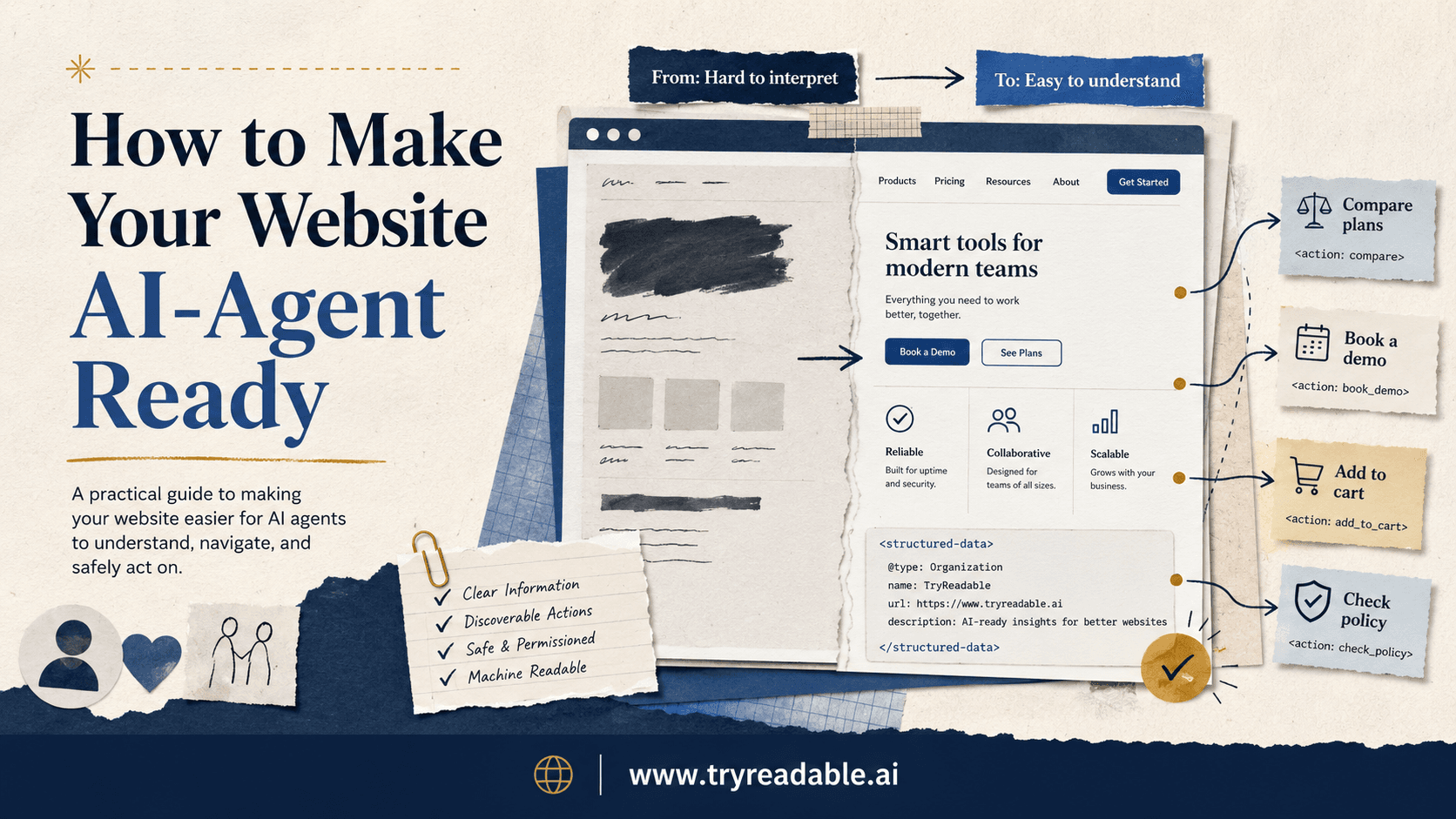
More teams are now asking a version of the same question: if AI assistants start researching, comparing, and taking actions on behalf of users, what does a website need to change?
The short answer is this:
Your website does not need to stop being human-first. It does need to become easier for software to understand, navigate, and use safely.
That is what AI-agent readiness really means.
An AI agent-ready website gives agents a clear path to do useful work without forcing them to guess every step from messy markup, vague labels, and brittle UI behavior. It also gives your team clear control over what agents can do, what requires user approval, and what should remain human-only.
This matters whether you are thinking about AI visibility, ecommerce, lead generation, self-serve SaaS onboarding, or support deflection. As AI systems become a larger part of discovery and decision-making, websites that are merely readable will have an advantage. Websites that are both readable and operable will have a bigger one.
If you want the protocol background first, read /blog/how-llms-discover-model-context-protocol-mcp. If you want the WebMCP-specific framing next, keep /blog/webmcp-implementation on deck. For the discovery layer, /blog/are-llms.txt-file-useful and /blog/what-is-an-ai-native-website-and-why-do-you-need-one are useful companions.
What AI-agent ready actually means
A website is AI-agent ready when an agent can do three things reliably:
- understand what the page is about
- identify which actions are available
- execute low-risk or user-approved actions without confusion
That is a much narrower and more practical goal than “make the whole site autonomous.”
Most teams do not need full agent execution across the entire website. They need a site that is easier for agents to interpret and less likely to fail when an assistant tries to help a user complete a task.
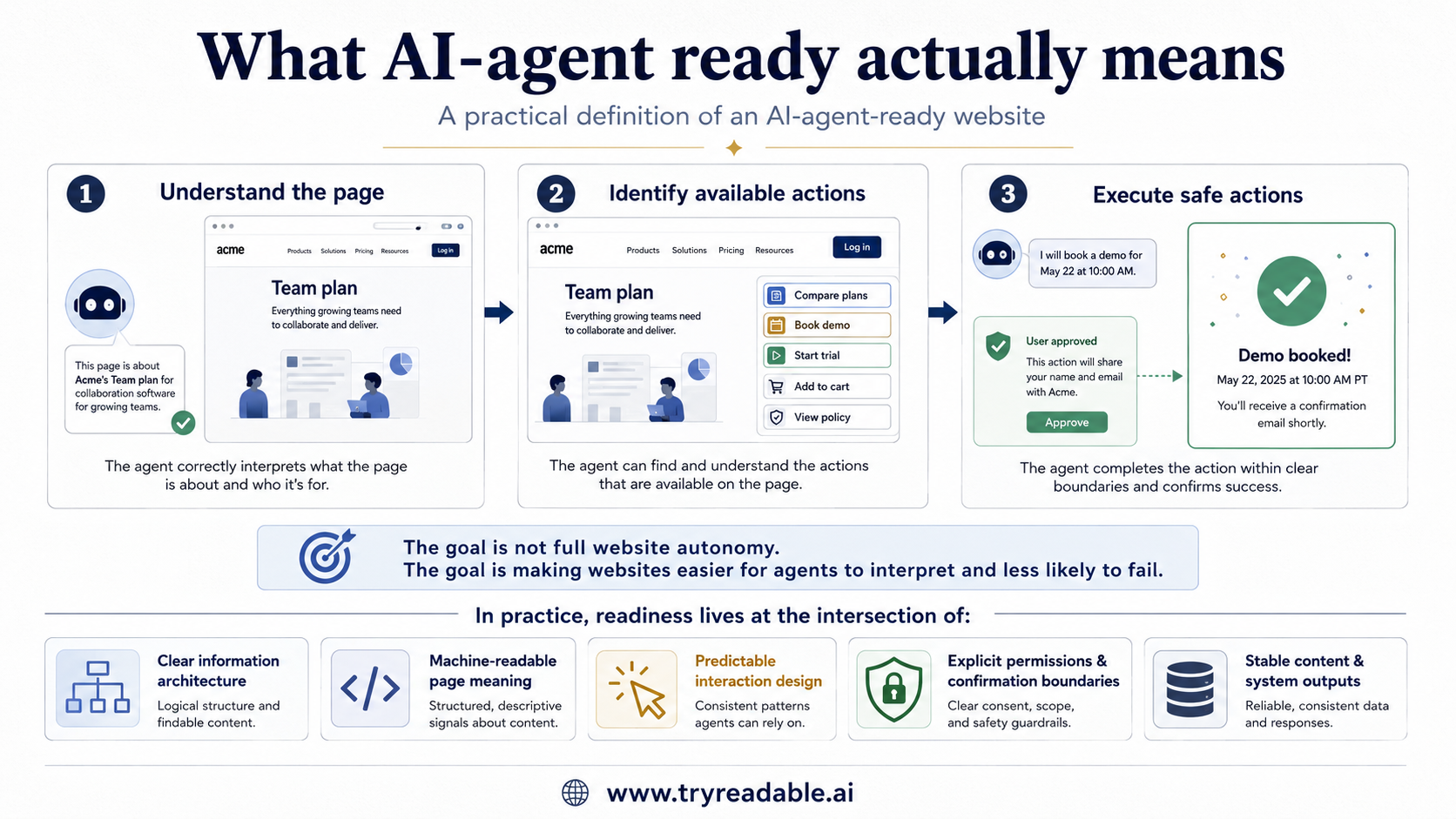
In practice, AI-agent readiness lives at the intersection of:
- clear information architecture
- machine-readable page meaning
- predictable interaction design
- explicit permissions and confirmation boundaries
- stable content and system outputs
Why this matters now
Today, agents often have to reverse-engineer websites.
They inspect the page, guess which element is the real CTA, infer which filters change state, figure out where product data actually lives, and recover from edge cases like popups, silent form errors, or changing layouts.
That makes agent use expensive, slow, and brittle.
The Model Context Protocol exists because AI applications need a more standardized way to connect to tools and data. WebMCP pushes that idea closer to the website layer by proposing a structured interaction surface for web actions. Even if your team is not implementing WebMCP right away, the design lessons behind it are already useful: make actions explicit, make meaning machine-readable, and reduce hidden state.
This is not only a future-looking engineering problem. It is already a product and growth problem.
If an assistant cannot confidently understand your plans, product details, pricing logic, booking flow, or checkout path, it is harder for that assistant to recommend you or act on a user's intent.
The core shift: from pages to tasks
Traditional web teams think mostly in pages:
- homepage
- pricing page
- product page
- demo form
- checkout page
AI-agent readiness asks you to think in tasks instead:
- compare plans
- find the right product
- book a demo
- start a trial
- add an item to cart
- check return rules
- update account preferences
That shift matters because agents do not care about your navigation map as much as they care about completing the user's job.
If the task is spread across inconsistent content, unclear labels, hidden validation, and unstable components, the agent will struggle. If the task is cleanly represented, the agent has a better shot.
The 8-part readiness checklist
Here is a practical framework for making a website more AI-agent ready.
1. Make page purpose obvious
An agent should not have to guess whether a page is a category page, comparison page, product page, policy page, account page, or booking flow.
That means:
- one clear primary purpose per page
- descriptive headings
- consistent page titles
- obvious primary actions
- fewer decorative labels that hide the real intent
This helps humans too. But it matters even more for agents, which often use headings, semantic structure, and visible page language as clues for what the page can do.
A simple litmus test is this: could a brand-new teammate explain the page's main job in one sentence within five seconds? If not, an agent likely has the same problem.
2. Structure content so machines can parse it cleanly
AI systems do better when websites expose meaning consistently.
That means:
- stable headings instead of visually styled div soup
- real labels for forms and inputs
- descriptive button text instead of generic
Continueeverywhere - consistent product, pricing, and policy fields
- structured data where it genuinely fits the page
Google's structured data guidance is still a useful reference here. Even though structured data is not the same thing as agent tooling, it trains teams to think in explicit entities and fields rather than purely visual layout.
For many sites, this is the first big unlock. You do not need a new protocol to benefit from cleaner machine-readable structure.
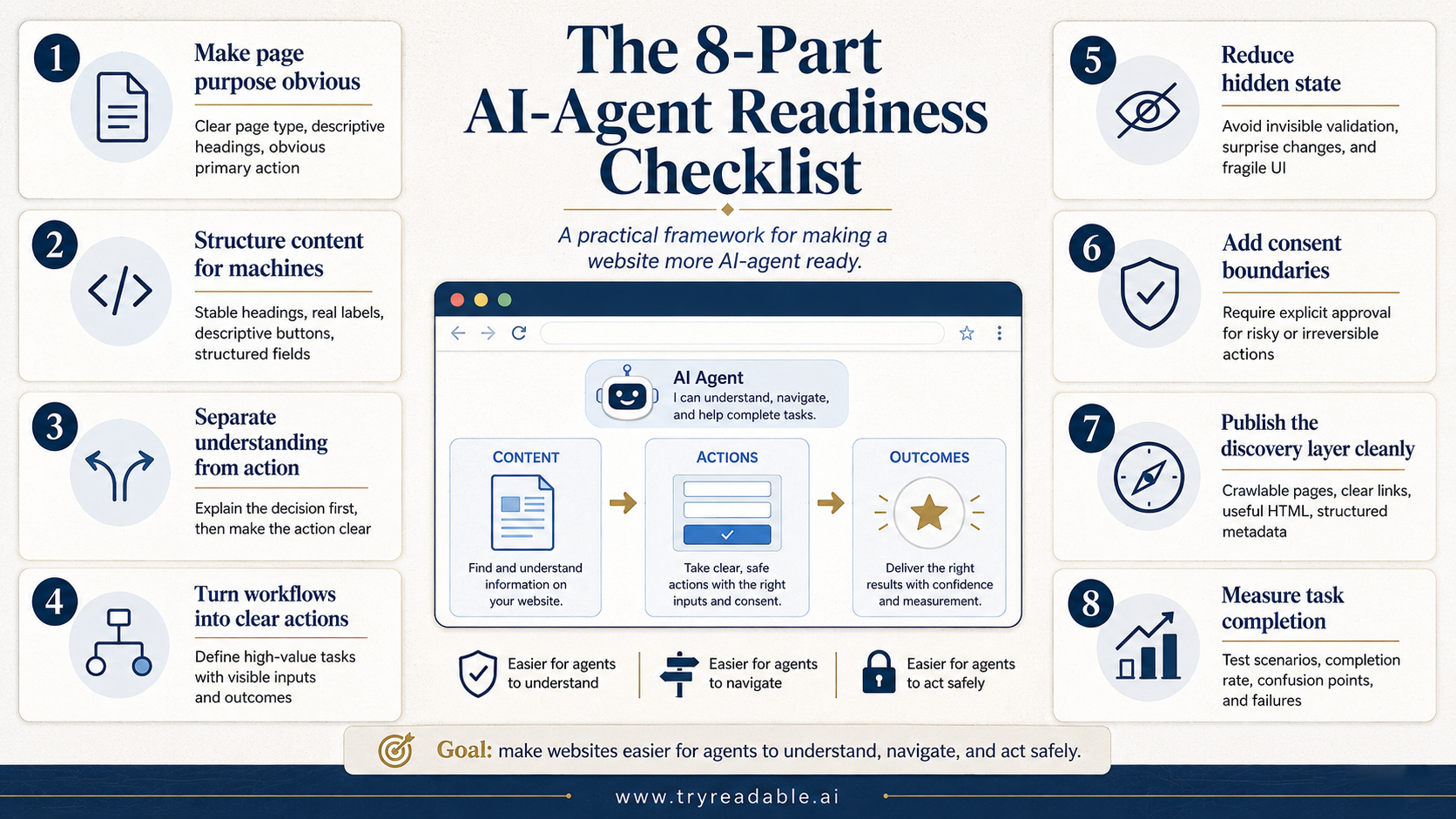
3. Separate content understanding from action execution
One reason many sites feel difficult for agents is that the website mixes explanation and execution too tightly.
For example:
- pricing information may be split across hero copy, FAQs, tooltips, and checkout
- product capability details may live partly in tabs, partly in comparison tables, and partly behind hover states
- booking or trial actions may depend on unstated prerequisites
The cleaner pattern is:
- content explains what the action is
- the action has a clear label
- inputs are explicit
- results are explicit
- permission boundaries are explicit
That separation makes it easier for an agent to first understand the decision and then take the next step.
4. Turn high-value workflows into clear, stable actions
This is where AI-agent readiness starts becoming operational.
Pick the handful of tasks that matter most commercially.
For a SaaS company, that might be:
- compare plans
- request a demo
- start a trial
- find integration details
- answer security or procurement questions
For ecommerce, it might be:
- search products
- apply filters
- compare variants
- add to cart
- begin checkout
- review shipping and return terms
For a service business, it might be:
- find the right service tier
- check fit criteria
- submit a lead form
- book a call
Once you have the list, ask:
- is the action name obvious?
- are inputs clear?
- are prerequisites visible?
- is success obvious?
- is failure obvious?
- would an agent know what to do next?
If the answer is no, the workflow is not ready yet.
5. Reduce hidden state and fragile UI behavior
Agents struggle with hidden state.
Humans can infer that a filter panel collapsed, a sticky header covered an element, a modal stole focus, or a button became disabled because a size was not selected.
Agents often cannot infer that reliably.
Common problems include:
- forms with invisible validation rules
- cart or pricing state that changes without clear feedback
- buttons that look identical but do different things in different contexts
- content hidden behind hover-only interactions
- SPA flows that change state without obvious URL or content updates
If you want your site to be easier for AI assistants to operate, reduce those traps.
A good rule is: if a user cannot tell what just happened from visible text and state alone, an agent probably cannot either.
6. Add explicit consent boundaries for risky actions
Not every action should be easy for agents.
Some actions should be easy to understand but hard to execute without explicit user approval.
That includes:
- purchases
- payment changes
- account updates
- irreversible submissions
- data sharing
- identity-sensitive operations
The MCP security principles are useful here even outside direct MCP implementations. The official guidance emphasizes user consent, clear disclosure, and careful control over tool invocation and data access.
For websites, that means your team should intentionally define:
- which actions are safe to prepare automatically
- which actions require confirmation
- which actions should remain human-only
- what evidence of approval is required
AI-agent readiness is not about removing friction everywhere. It is about putting friction in the right places.
7. Publish the discovery layer cleanly
Many teams jump straight to actions and skip discoverability.
That is a mistake.
Before an agent can do anything useful, it has to discover the right page, understand what kind of page it is, and trust the information enough to act on it.
That means your site still needs:
- crawlable, stable URLs
- clear internal linking
- useful HTML content without critical meaning trapped in visuals alone
- consistent brand, product, and policy information
- structured metadata where appropriate
- a clear stance on
llms.txtand other AI-discovery surfaces
This is where classic site quality and AI readability overlap.
WebMCP or other agent-action layers do not replace the discovery layer. They sit on top of it.
8. Measure whether agents can actually complete tasks
Teams often talk about agent readiness in theory. Very few measure it.
You should.
At a minimum, define test scenarios such as:
- find the right plan for a given buyer type
- locate return policy details for a product
- compare two product variants under a budget
- book a demo for a specific use case
- start a trial and reach the first success screen
Then track:
- task completion rate
- time to completion
- points of confusion
- where the agent guessed wrong
- where the website hid a critical step
- where approval or permissions were unclear
If you are serious about AI-agent readiness, this becomes a product QA motion, not just a content exercise.
What WebMCP changes, and what it does not
A lot of teams hear “agent-ready website” and assume it means a full WebMCP rollout.
Not necessarily.
WebMCP is promising because it proposes a structured client-side way to expose interaction metadata so agents can map UI elements to actions more efficiently. That could reduce the need for heavy DOM inference and repeated trial-and-error.
But you do not need to wait for widespread WebMCP adoption to improve readiness.
You can get real gains now by:
- cleaning up information architecture
- clarifying action labels
- normalizing structured content
- simplifying workflows
- tightening consent boundaries
- making system responses more explicit
Think of WebMCP as an accelerator for a website that is already operationally clean.
If the underlying site is confusing, a new agent layer will not save it.
What good looks like for different teams
For marketing teams
A marketing team should care about whether an agent can:
- understand positioning accurately
- compare plans without mixing them up
- retrieve current proof, policy, and pricing context
- hand off to the right CTA without getting lost
That means reducing vague messaging, duplicated claims, and inconsistent product language across pages.
For product teams
A product team should care about whether an agent can:
- identify user-safe actions
- navigate stateful flows cleanly
- recover from validation issues
- understand success and failure outcomes
That means defining tasks at the system level, not just the interface level.
For ecommerce teams
An ecommerce team should care about whether an agent can:
- search and filter inventory reliably
- understand availability and variants
- compare products on real attributes
- add items to cart correctly
- stop before checkout when approval is required
That means product data quality, cart clarity, and explicit variant logic become part of the agent-readiness conversation.
A simple maturity model
You do not need a massive roadmap to get started. A simple maturity model is enough.
Level 1: Readable
The site is crawlable, semantically structured, and understandable.
Level 2: Predictable
Important workflows use clear labels, explicit validation, stable outputs, and visible success states.
Level 3: Actionable
High-value tasks are defined clearly enough that an assistant can execute low-risk steps with minimal guesswork.
Level 4: Agent-aware
The site intentionally exposes machine-readable actions, permissions, and confirmation boundaries, potentially using standards such as WebMCP where they fit.
Most teams are still somewhere between Level 1 and Level 2. That is fine. The point is to move intentionally.
Where to start this quarter
If your team wants a practical next step, do this in order:
- list your top 5 website tasks by business value
- walk through each task as if an assistant had to complete it
- note every hidden assumption, ambiguous label, and silent state change
- fix the content and UX issues first
- define explicit approval boundaries for risky actions
- evaluate whether a structured action layer such as WebMCP would improve the flow further
That sequence keeps you focused on durable improvements instead of chasing protocol theater.
The real goal
The goal is not to impress AI systems with a shiny demo.
The goal is to make your website easier for software to understand and safer for software to use on behalf of real people.
That is a product quality issue, a growth issue, and increasingly a competitive issue.
The websites that perform best in an agent-mediated world will not just publish good content. They will pair strong content with explicit actions, predictable systems, and trustworthy consent design.
That is what AI-agent ready looks like.
If you want the next step from here, continue with /blog/webmcp-implementation for the implementation lens.
Sources
- Model Context Protocol docs: Introduction
- Model Context Protocol specification, version 2025-06-18
- Model Context Protocol security and transport guidance
- webMCP: Efficient AI-Native Client-Side Interaction for Agent-Ready Web Design
- Google Search Central: Introduction to structured data markup in Search
Want to Make Your Website AI-Agents Ready?
Start turning AI agents' traffic into revenue for your business


