If your team has started hearing terms like MCP, WebMCP, agent-ready websites, or AI actions, it is easy for the conversation to get technical fast.
Here is the simple version.
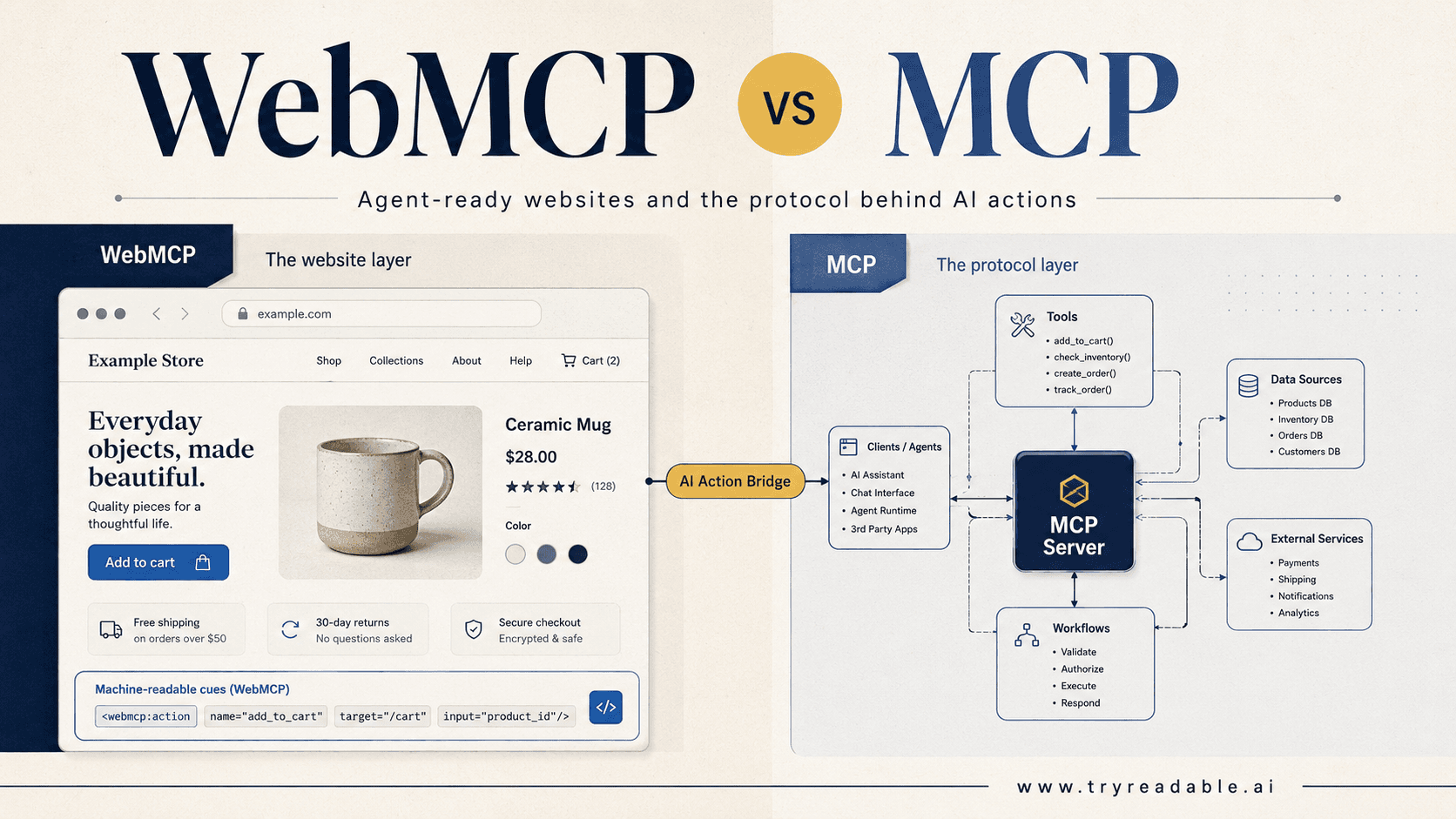
WebMCP is best understood as a website design approach for AI agents. The idea is to make a website easier for an AI system to understand and act on without forcing the system to guess its way through raw HTML, buttons, menus, and forms.
That is different from the official Model Context Protocol, usually shortened to MCP. MCP is a real open protocol for connecting AI applications to tools, data sources, and workflows. Anthropic introduced it on November 25, 2024, and the official docs describe it as a standard way for AI applications like Claude or ChatGPT to connect to external systems. See the Anthropic announcement and the official MCP documentation.
WebMCP, by contrast, is not the main official web standard that website teams should assume every AI platform already supports today. The term comes from a 2025 research paper, webMCP: Efficient AI-Native Client-Side Interaction for Agent-Ready Web Design, which proposes a lighter, website-side interaction layer for agentic browsing.
So if you only remember one thing, remember this:
MCP is an official protocol for connecting AI systems to tools and data. WebMCP is an emerging idea for making websites easier for AI agents to use.
Why people are talking about WebMCP now
AI products are moving beyond simple chat.
OpenAI’s March 11, 2025 update on new tools for building agents made it clear that developers increasingly want agents that can search, inspect files, and use computers. MCP docs also now distinguish between local MCP servers and remote MCP servers, with remote setups aimed at web-based AI applications and authenticated services.
That shift matters for website teams.
When AI agents try to complete tasks on websites today, they often rely on one of two messy methods:
- They parse normal page markup and try to infer what every control does.
- They use browser or computer-use tooling to click around like a human would.
Both approaches can work. Neither is ideal.
They are slower than direct integrations, more brittle than APIs, and more likely to fail when a site changes its layout, label copy, or front-end logic.
WebMCP exists because people want a middle layer between “the agent sees only pixels and HTML” and “the site must ship a full backend integration for every assistant.”
What WebMCP means in practice
In plain English, WebMCP means giving an AI agent clearer website instructions.
Instead of making the model guess which button starts checkout or which form field changes a shipping option, a WebMCP-style site would expose structured clues such as:
- what important page elements are
- which actions are available
- what each action needs as input
- what state changes after the action runs
- what
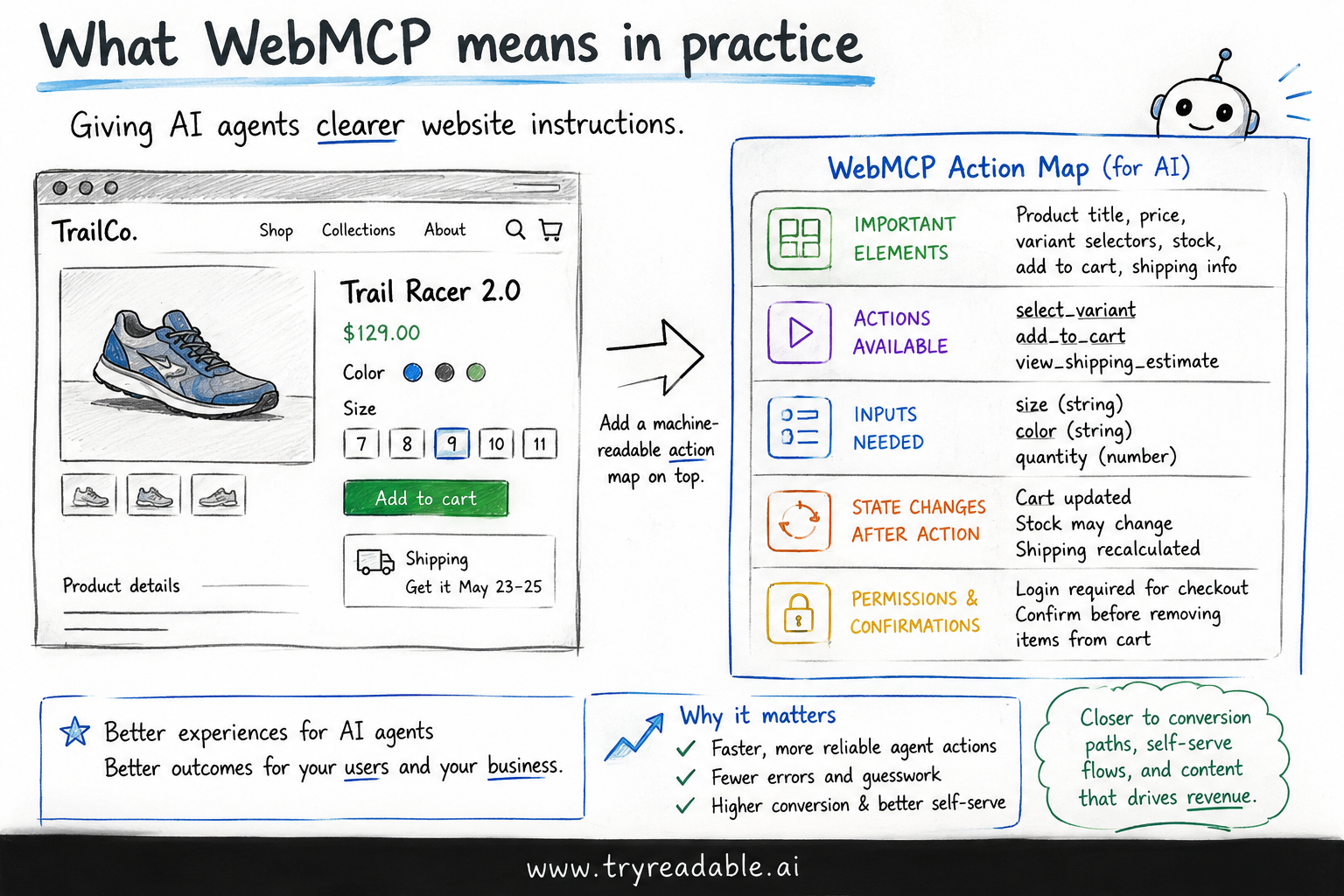
permissions or confirmations are required
You can think of it like adding a clearer machine-readable action map on top of your existing website.
That is why WebMCP is often interesting to product and growth teams, not just engineering teams. It sits close to conversion paths, self-serve flows, and content surfaces that already matter for revenue.
WebMCP vs MCP
The easiest way to separate the two is to ask where the intelligence lives.
| Term | Main job | Usually lives | Best for |
|---|---|---|---|
| MCP | Connect an AI app to tools, data, and workflows | In an app, server, or system integration | Deep tool access, authenticated workflows, product integrations |
| WebMCP | Make a public website easier for agents to understand and operate | In the website experience itself | Website actions, browsing flows, product discovery, simpler agent navigation |
llms.txt | Give crawlers and assistants a discovery hint about important pages | At the site root | Content discovery and documentation wayfinding |
The official MCP architecture is client-server based. The docs describe hosts, clients, and servers, along with transports such as STDIO for local connections and Streamable HTTP for remote ones. MCP servers can expose tools, resources, and prompts, and remote MCP servers commonly require authentication and permission controls. See the MCP architecture overview and the page on remote MCP servers.
WebMCP is more website-native. The 2025 webMCP paper proposes embedding structured interaction metadata directly into web pages so agents can understand what the page is for and what actions they can safely take.
That means WebMCP is not a replacement for MCP.
It is closer to a complement.
If MCP helps an AI assistant talk to systems behind the curtain, WebMCP is about making the curtain easier to read from the front of the house.
A simple example
Imagine an ecommerce product page.
A normal page might show:
- product title
- price
- size selector
- color selector
- inventory state
- add-to-cart button
- shipping estimate widget
A human shopper can understand that quickly.
An AI agent often cannot, at least not reliably enough.
A WebMCP-style layer would tell the agent something more like this:
{
  "pageType": "product-detail",
  "primaryEntity": "running-shoe",
  "actions": [
    {
      "name": "select_variant",
      "inputs": ["size", "color"],
      "required": true
    },
    {
      "name": "add_to_cart",
      "dependsOn": ["select_variant"],
      "confirmationRequired": false
    },
    {
      "name": "start_checkout",
      "confirmationRequired": true
    }
  ]
}
That is not necessarily the exact final format every platform will adopt. It is an example of the core idea.
The website is telling the agent, “Here are the meaningful actions, here is the order, and here is what the user would need to approve.”
Why marketing and product teams should care
This is not just a developer topic.
If AI agents become a real part of product discovery, evaluation, support, and checkout, then the teams who own conversion and messaging should care about whether an agent can:
- find the right page
- understand the offer
- compare options correctly
- complete the intended next step
- avoid the wrong step
That affects a surprising number of business outcomes:
- self-serve signup completion
- demo booking flows
- ecommerce add-to-cart and checkout starts
- support deflection
- product recommendation quality
- partner and integration discovery
- branded product facts showing up correctly in AI answers
Marketing teams should especially care because a lot of AI visibility work starts before an agent ever clicks a button. If the site is hard to parse, has weak structure, or hides important facts in cluttered UI patterns, the model may never reach the right action at all.
That is one reason we keep pushing teams to think beyond classic SEO alone. Our guides on how LLMs discover MCP, whether llms.txt is useful, and what makes a website AI-native all point to the same broader shift: websites need to become easier for machines to retrieve, interpret, and trust.
What WebMCP would change on a real website
For most teams, WebMCP does not mean rebuilding the entire stack.
It usually points to a more practical checklist:
- identify the few actions that matter most to users and revenue
- make those actions explicit and consistently labeled
- reduce UI ambiguity around forms, variants, pricing, and next steps
- expose stable machine-readable signals where possible
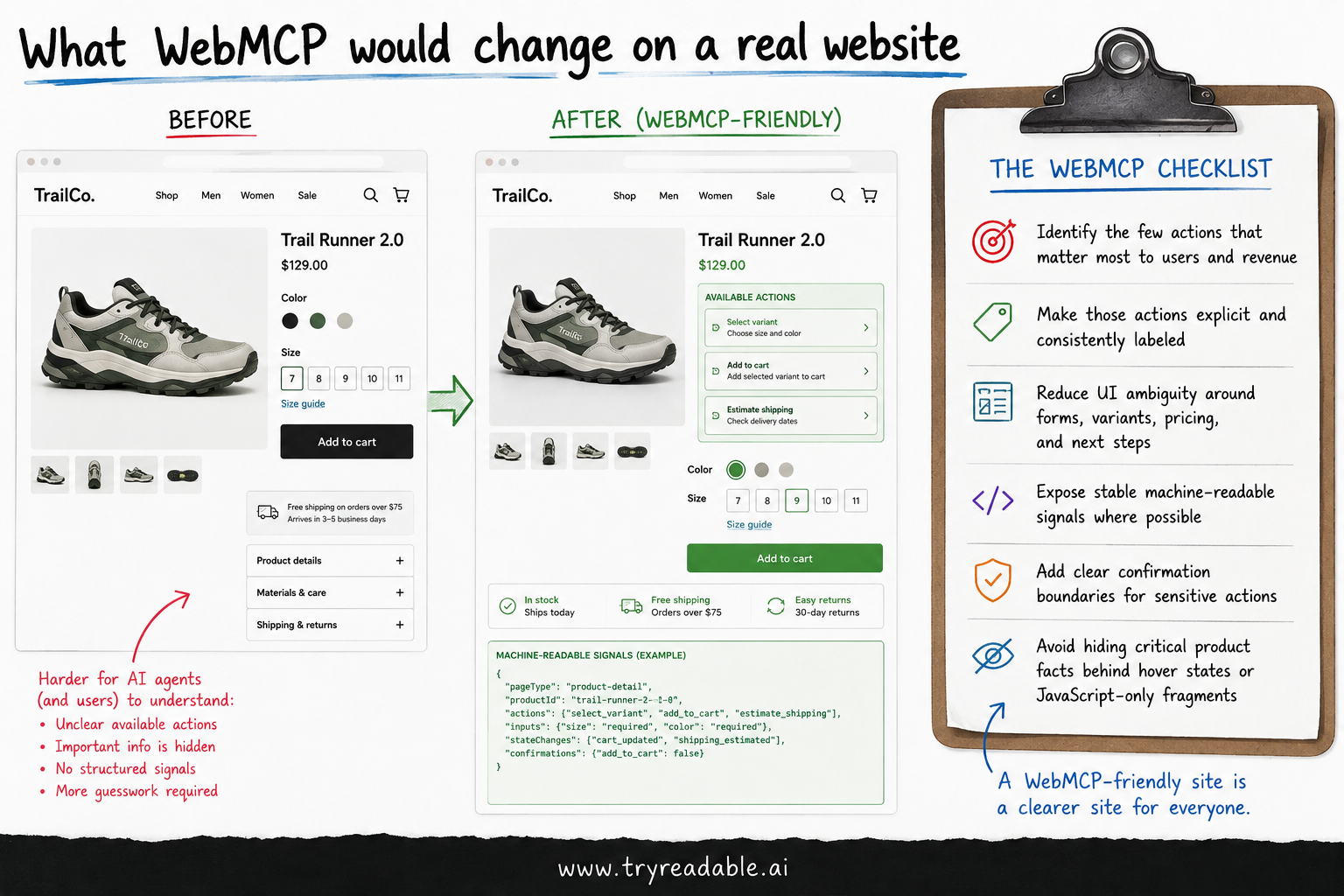
- add clear confirmation boundaries for sensitive actions
- avoid hiding critical product facts behind hover states or JavaScript-only fragments
In other words, a WebMCP-friendly site is usually also a clearer site.
That is one reason the idea is valuable even before there is one universally adopted implementation standard.
What WebMCP does not replace
This is where teams can get confused.
WebMCP does not replace:
- your API strategy
- the official Model Context Protocol
- search visibility basics
- structured data
- good information architecture
- secure permission design
- human UX
It also does not automatically make a site “AI-ready” just because you add metadata.
If the underlying flow is confusing for humans, it will probably still be confusing for agents.
If the site has unclear permissions, weak trust signals, or missing product facts, the machine-readable layer will not fix the business problem on its own.
The security and permissions angle
This part deserves more attention than it usually gets.
The official MCP docs for remote servers emphasize authentication and tool permission controls. They also recommend reviewing what a connector can access before enabling it. That same design mindset matters on the website side.
If agents can trigger real actions, teams need to define:
- which actions are informational only
- which actions require user confirmation
- which actions should be blocked entirely for agents
- what logs or audit trails should exist
- how the user can see what the agent is about to do
For marketing and product teams, the key point is simple: agent-ready does not mean agent-unrestricted.
The best implementations will likely feel more like good checkout and permissions design than like a clever AI demo.
Is WebMCP something your team should do right now?
Usually, yes in principle, but not as a giant standalone project.
A good near-term approach is:
- Fix the pages and flows that matter most.
- Make core website actions clearer and more structured.
- Use official MCP where deeper product or system integrations make sense.
- Treat WebMCP as a design direction for the website layer.
That is a much better approach than waiting for a perfect standard and doing nothing.
If your team wants the more implementation-focused version, start with our pillar guide: WebMCP Implementation Guide: Make Your Website Agent-Ready.
The bottom line
WebMCP is best understood as an emerging website-side pattern for helping AI agents understand pages and complete actions more reliably.
MCP is the official protocol.
WebMCP is the practical website layer many teams now want on top of normal web experiences.
So the strategic question for marketing and product teams is not “Should we bet everything on WebMCP as a settled standard?”
It is:
Which website journeys do we want AI agents to understand, trust, and complete successfully over the next 12 months?
Teams that answer that question clearly will be in a much better position to win both human traffic and agent-driven traffic.
Sources and further reading
Is your website ready for AI agents to complete tasks?
Learn how WebMCP and agent-ready design can reduce friction in your conversion flows and unlock new revenue paths through AI automation.