

Table of contents
- What Are Meta Ads AI Connectors and Why Meta Built Them
- The Meta Ads CLI: The Core Tool Powering AI Agent Control
- What You Can Actually Do With Meta Ads AI Connectors
- How to Connect Your AI Agent to Meta Ads
- Which AI Platforms Support Meta Ads AI Connectors
- What This Means for Your Business: Real Advantages for Founders and Marketers
- How to Take Your First Step With Meta Ads AI Connectors
- The Bottom Line
If you have ever wished your AI assistant could just go ahead and manage your Meta ad campaigns for you, that wish just got a lot more realistic. Meta has officially released something called Meta Ads AI Connectors, and it is one of the most significant changes to how businesses can interact with their advertising accounts in years.
This is not a third-party hack or a workaround someone built over a weekend. This is an official release from Meta, documented on their developer platform, and it changes the rules for how founders, marketers, and the AI tools they use can interact with Meta Ads.
In this article, we are going to break down exactly what Meta Ads AI Connectors are, what the new Ads CLI tool does, what you can actually accomplish with it today, and how your business can start taking advantage of it right now. No developer background required to understand this. Let us get into it.
What Are Meta Ads AI Connectors and Why Meta Built Them
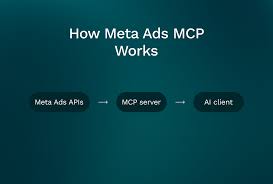
Until very recently, if you wanted to automate anything inside your Meta ad account, you had two options. You could use Meta's Marketing API directly, which required a developer to write custom code for every single interaction. Or you could use a third-party tool that someone else had already built on top of that API, which meant trusting another company's infrastructure and paying for the privilege.
Neither option was great for most founders and marketers who just wanted to move fast and stay in control.
Meta heard this feedback. According to Meta's official developer blog post announcing the Ads CLI, developers consistently reported that the Meta Marketing API is powerful but painful to use programmatically. Every time you wanted to do something, you had to write the same boilerplate code over and over: authentication logic, pagination handling, output formatting, error handling. These repetitive tasks slowed everything down and made it genuinely hard to build automated workflows around ad management.
Meta Ads AI Connectors solve this problem at the root.
Instead of requiring custom code for every interaction, Meta has packaged the entire Marketing API into a set of standardized, reliable tools. These tools work the same way every time, produce predictable outputs, and can be used by both human developers and AI agents without writing a single line of custom code.
The key word here is "official." This is not a third-party workaround. Meta built and released this themselves, which means it is supported, maintained, and designed to work reliably with the rest of the Meta advertising ecosystem. That matters enormously for businesses that need stability in their ad infrastructure.
The practical implication for founders and marketers is this: AI agents can now interact with your Meta ad account in a structured, safe, and officially sanctioned way. Your AI assistant is no longer just giving you advice about your ads. It can now actually manage them, if you set it up correctly.
The Meta Ads CLI: The Core Tool Powering AI Agent Control
At the center of the Meta Ads AI Connectors release is a tool called the Ads CLI. CLI stands for command-line interface, which is a way of interacting with software by typing commands rather than clicking through a visual interface. If that sounds technical, do not worry. The important thing is understanding what it does and why it matters for your business.
The Ads CLI is essentially a translator. It takes the full complexity of the Meta Marketing API and wraps it into simple, predictable commands that anyone or anything can run. According to Meta's developer blog, the CLI was built specifically so that both developers and AI agents can use it reliably without needing to write custom integration code.
Here is what that looks like in practice. Instead of writing hundreds of lines of code to pull campaign performance data, an AI agent can simply run:
meta ads campaign list
Or to get performance insights for a specific campaign over the last seven days:
meta ads insights get --campaign_id CAMPAIGN_ID --date-preset last_7d --fields conversions,impressions
These are real commands from Meta's official documentation. They are clean, readable, and produce consistent outputs every time. An AI agent can run these commands, read the results, and take action based on what it finds, all without a human having to manually pull reports or interpret data.
The CLI supports multiple output formats, including JSON and plain tab-separated values. This is important because it means the output can slot directly into automated workflows, whether you are debugging something interactively or running fully automated tasks through a CI/CD pipeline. The tool is designed to integrate, not to exist in isolation.
One of the most important safety features built into the Ads CLI is that all resources are created in PAUSED status by default. This means that when an AI agent creates a new campaign, ad set, or creative, nothing goes live automatically. You have to explicitly push things live when you are ready. This is a critical guardrail that prevents accidental spend and gives you full control over what actually runs.
For founders and marketers, this default-paused behavior is the difference between a tool you can trust and one that keeps you up at night. You can let an AI agent do the heavy lifting of building out campaign structures, then review and approve before anything touches your budget.
What You Can Actually Do With Meta Ads AI Connectors
Now let us get concrete. What can you actually do with Meta Ads AI Connectors today? The capabilities are broader than most people expect.
Campaign Creation and Management
You can create, list, update, and delete campaigns entirely through an AI interface. This includes setting campaign objectives, daily budgets, and names. For example, creating a campaign with a $50 daily budget and a sales objective looks like this in the CLI:
meta ads campaign create --name "Summer Sale" --objective OUTCOME_SALES --daily-budget 5000
The budget value is in the smallest currency unit (cents for USD), so 5000 equals $50.00. This kind of precision is built into the tool so there is no ambiguity.
Ad Set Configuration
Once a campaign exists, you can create ad sets with full targeting and bidding configuration. You can specify optimization goals, billing events, bid amounts, and target countries, all through a single command. An AI agent can build out multiple ad sets with different targeting configurations in the time it would take a human to navigate through Ads Manager manually.
Creative Management
You can create ad creatives with images, body copy, headlines, call-to-action buttons, and destination URLs. The CLI handles the image upload and creative assembly in one step. This means an AI agent can take a brief, generate copy, and assemble a complete creative ready for review, without anyone touching Ads Manager.
Connecting Everything Together
Once campaigns, ad sets, and creatives exist separately, you can connect them together and push them live when ready. The workflow is designed to be modular, so you can build pieces independently and assemble them when everything is approved.
Performance Insights
You can pull performance data filtered by date range and specific metrics like conversions, impressions, clicks, and spend. This is where AI agents become genuinely powerful. An agent can pull insights on a schedule, identify underperforming campaigns, and either flag them for human review or make adjustments automatically based on rules you define.
Budget and Bidding Updates
You can update budgets and bidding parameters through the CLI, which means an AI agent can implement budget optimizations without anyone logging into Ads Manager. If your agent identifies that a campaign is hitting its daily budget cap before noon, it can increase the budget automatically or alert you with a specific recommendation.
The full scope of what is available is documented in Meta's developer platform for Ads AI Connectors, and the capabilities are expected to expand as the tool matures.
For marketers who spend hours each week on repetitive ad management tasks, this represents a genuine shift in how that time can be spent. The mechanical work of updating budgets, swapping creatives, and pulling reports can be delegated to an AI agent. The human role shifts toward strategy, creative direction, and final approval.
If you want to understand how readable, clear communication fits into your broader marketing workflow, the TryReadable guides section covers how to think about content and messaging quality across channels.
How to Connect Your AI Agent to Meta Ads
Getting started with Meta Ads AI Connectors requires a few things to be in place. Here is a straightforward walkthrough of what the setup process looks like.
What You Need Before You Start
You need access to the Meta Marketing API and a configured ad account ID. If you are already running Meta ads through a business account, you likely have both of these. The ad account ID is visible in your Ads Manager URL and in your account settings.
You also need to be comfortable with the idea of giving an AI agent access to your ad account. Meta has built safety guardrails into the system (like the default-paused status for new resources), but you should still think carefully about what level of access you want to grant and what actions you want to allow versus require human approval for.
Installation and Authentication
The installation and authentication process is handled through the CLI setup documented on Meta's developer platform. The setup guide walks through installing the CLI, authenticating with your Meta account, and connecting your ad account ID. This is a one-time setup process.
Connecting to an AI Interface
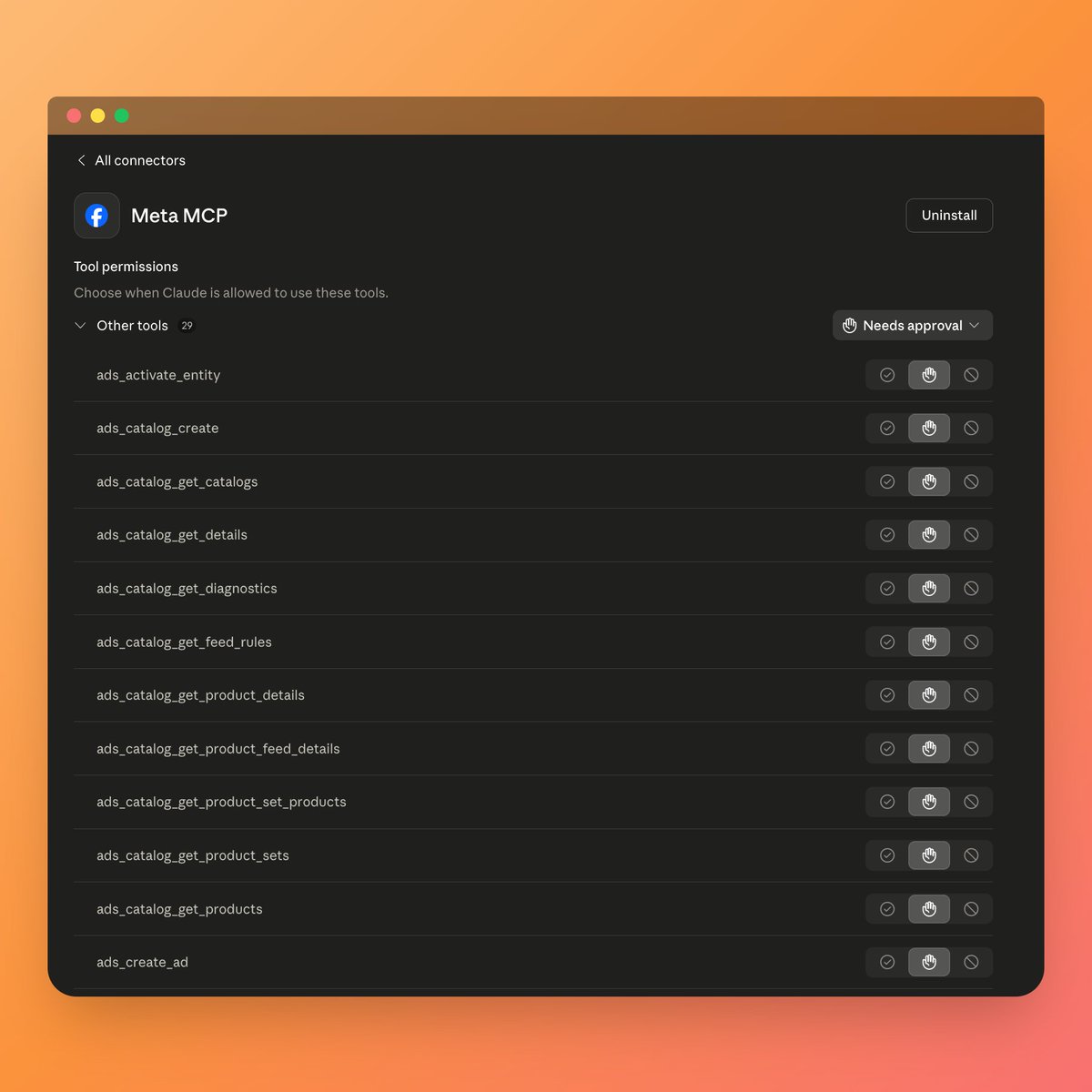
The Meta Ads CLI works with AI interfaces that support MCP, which stands for Model Context Protocol. MCP is an open standard created by Anthropic that allows AI applications to connect to external tools and data sources in a standardized way. Think of it as a universal plug that lets AI agents connect to external services without custom integration work for each one.
Meta's Business Help Center has a dedicated guide specifically for connecting AI agents to manage Meta ads. This guide is written for business users, not just developers, and walks through the process of connecting your preferred AI interface to your Meta ad account.
The practical steps look something like this:
- Install the Meta Ads CLI following Meta's setup guide
- Authenticate with your Meta account credentials
- Connect your ad account ID to the CLI
- Run a simple test command like
meta ads campaign listto verify the connection works - Connect the CLI to your AI interface through that platform's connector or MCP settings
Starting Safely
Before you let an AI agent make any changes to your account, start with read-only commands. Pull a campaign list. Get some insights. Verify that the data coming back matches what you see in Ads Manager. Once you are confident the connection is working correctly and the data is accurate, you can expand to creation and editing commands.
This staged approach is not just good practice. It builds your confidence in the system and helps you understand how the AI agent interprets and acts on the data it receives.
Which AI Platforms Support Meta Ads AI Connectors
One of the most common questions founders and marketers will have is: which AI tools can I actually use with this? The answer depends on whether the AI platform supports MCP or CLI-based tool use.
Claude
Claude, built by Anthropic, supports custom connectors through remote MCP servers. According to Claude's Help Center documentation on custom connectors, this feature is available on Free, Pro, Max, Team, and Enterprise plans. Claude can connect to remote MCP servers, which means it can connect to the Meta Ads CLI as a tool and use it to manage your ad account directly within a Claude conversation.
This is a significant capability. You could have a conversation with Claude where you say "show me which of my campaigns had the lowest ROAS last week" and Claude would run the appropriate CLI command, retrieve the data, and give you a clear answer. You could then say "pause the bottom two" and Claude would execute those commands, with the changes taking effect in your account.
ChatGPT
OpenAI's developer platform and connectors framework also supports this type of tool integration. OpenAI's developer documentation covers how tools and connectors work within the ChatGPT ecosystem. Developers can build custom agents using the Meta Ads CLI as a backend tool, and the MCP and Connectors section of OpenAI's documentation covers how to integrate external tools into ChatGPT-based workflows.
Custom AI Agents
For businesses with development resources, the Meta Ads CLI provides a reliable, standardized backend for building fully custom AI agents. Because the CLI produces consistent, predictable outputs in formats like JSON, it is straightforward to build an agent that monitors performance, applies rules-based optimizations, and escalates decisions to humans when needed.
This is particularly valuable for agencies managing multiple client accounts or for larger businesses with complex campaign structures that need automated oversight at scale.
Other MCP-Compatible Platforms
The MCP standard is open and growing. Any AI platform that supports MCP tool use can, in principle, connect to the Meta Ads CLI. As MCP adoption expands across the AI tool ecosystem, the number of compatible interfaces will grow. Meta's decision to build on this open standard rather than a proprietary integration protocol is a deliberate choice that makes the Ads CLI more future-proof.
For founders evaluating which AI tools to invest in for their marketing stack, MCP compatibility is now a meaningful criterion. Tools that support MCP will be able to connect to an expanding ecosystem of official integrations like this one.
What This Means for Your Business: Real Advantages for Founders and Marketers
Let us step back from the technical details and talk about what this actually means for your business. Because the real question is not "what can the CLI do" but "how does this change what is possible for my team."
Faster Campaign Creation Without Developer Dependency
One of the most common bottlenecks in marketing teams is the gap between having an idea and getting it live. If implementing a new campaign structure requires a developer to write API integration code, that idea might sit in a backlog for weeks. With Meta Ads AI Connectors, a marketer can describe what they want to an AI agent and have a complete campaign structure built and ready for review in minutes.
This is not about replacing marketers. It is about removing the technical friction that slows marketers down. The strategic thinking, the creative direction, the audience insights, those still require human judgment. But the mechanical execution can be handled by an AI agent.
Automated Performance Monitoring and Optimization
An AI agent connected to your Meta ad account can monitor performance continuously, not just when someone remembers to check. It can pull insights on a schedule, compare performance against benchmarks, and flag issues before they become expensive problems.
More importantly, it can act on what it finds. If you define rules like "pause any ad with a frequency above 4 and a CTR below 0.5%" the agent can enforce those rules automatically. If you want human approval before any budget changes above a certain threshold, you can build that into the workflow.
This kind of systematic, rules-based optimization is something most marketing teams aspire to but rarely achieve consistently because it requires constant attention. An AI agent does not get distracted or forget to check.
Reduced Human Error in Repetitive Tasks
Budget updates, creative swaps, campaign duplications, these are the tasks where human error is most likely to occur. Typing the wrong budget amount, applying the wrong creative to the wrong ad set, forgetting to update a campaign name after duplicating it. These mistakes happen, and they cost money.
When an AI agent handles these tasks through the CLI, the commands are precise and the outputs are verifiable. You can review what the agent did and confirm it matches your intent before anything goes live. The default-paused behavior adds another layer of protection.
Automated Workflows Inside Tools Your Team Already Uses
Perhaps the most underappreciated advantage is that this integration can live inside the tools your team already uses daily. If your team uses Claude for writing and research, you can add Meta Ads management to that same interface. You do not need to adopt a new platform or train your team on new software.
This reduces the adoption friction that kills most new tool initiatives. When the capability is available inside a tool people already open every day, they are far more likely to actually use it.
For businesses thinking about how to communicate these capabilities clearly to their own audiences, TryReadable's readability analysis tool can help ensure your marketing copy is as clear and accessible as this kind of technical content needs to be.
A Competitive Advantage That Is Available Right Now
Most businesses are not yet using Meta Ads AI Connectors. The release is recent, the documentation is still being discovered, and the majority of marketing teams have not yet figured out how to integrate this into their workflows. That means there is a genuine first-mover advantage available to founders and marketers who move quickly.
The businesses that figure out how to run faster, more systematic ad management through AI agents will have a structural advantage over competitors who are still doing everything manually. That advantage compounds over time as the AI agents learn more about what works and the workflows become more refined.
If you want to see how other brands are thinking about AI-powered marketing workflows, the TryReadable brands page has examples worth exploring.
How to Take Your First Step With Meta Ads AI Connectors
Reading about a new capability is one thing. Actually using it is another. Here is a clear, low-friction action plan to move from reading this article to having Meta Ads AI Connectors working for your business.
Step 1: Visit Meta's Official Setup Guide
Start at Meta's developer platform for the Ads CLI. This is the official source of truth for installation and authentication. Follow the setup instructions to install the CLI and authenticate with your Meta account. This is a one-time process.
Step 2: Connect Your Ad Account
Once the CLI is installed and authenticated, connect your ad account ID. Your ad account ID is visible in Ads Manager. The CLI setup guide walks through exactly how to do this.
Step 3: Run a Simple Verification Command
Before doing anything else, run a simple read-only command to verify the integration is working:
meta ads campaign list
This should return a list of your existing campaigns. Compare it to what you see in Ads Manager. If the data matches, your connection is working correctly.
Step 4: Connect to Your AI Interface
If you are using Claude, follow the custom connectors setup guide to add the Meta Ads connector through Claude's connector settings. If you are using a ChatGPT-based workflow, refer to OpenAI's developer documentation for how to add external tools.
Meta's Business Help Center guide for AI agents and Meta Ads is also worth bookmarking as a reference for the business-side setup.
Step 5: Start With Read-Only Commands
Spend your first sessions with the integration running only read-only commands. Pull insights. List campaigns. Get ad set details. Get comfortable with how the data looks and how the AI agent interprets it. This builds your confidence and helps you spot any issues before they affect your account.
Step 6: Move to Creation and Editing
Once you are confident in the read-only workflow, start experimenting with creation commands. Build a test campaign in PAUSED status. Create an ad set. Assemble a creative. Review the results in Ads Manager to confirm everything looks right. Then, when you are ready, push it live.
Step 7: Build Your Workflow
The real value comes from building repeatable workflows. Define the tasks you want the AI agent to handle automatically versus the ones that require human approval. Document those rules clearly so the agent has consistent guidance. Review the agent's actions regularly, especially in the early stages, to catch anything that does not match your intent.
This is not a set-it-and-forget-it situation. It is a collaboration between your judgment and the agent's execution capability. The more clearly you define the rules, the more reliably the agent will follow them.
If you want help thinking through how to communicate your AI-powered marketing capabilities clearly to your own customers and stakeholders, TryReadable's readability tools can help you make sure your messaging lands the way you intend. And if you want to explore how TryReadable can support your broader content and marketing strategy, booking a demo is a good next step.
The Bottom Line
Meta Ads AI Connectors represent a genuine shift in what is possible for founders and marketers managing Meta ad campaigns. This is not a marginal improvement. It is a new category of capability that did not exist in an official, reliable form before.
The Ads CLI packages the full power of the Meta Marketing API into simple, predictable commands that AI agents can use without custom code. Resources are created in PAUSED status by default, so nothing goes live accidentally. The integration works with AI platforms that support MCP, including Claude and ChatGPT-based workflows. And the whole thing is officially built and supported by Meta.
For businesses that move quickly, this is an opportunity to build a structural advantage in how they manage and optimize their Meta advertising. The mechanical work of ad management can be delegated to AI agents. The human role shifts to strategy, creative direction, and final approval.
The first step is simple: visit Meta's official Ads CLI setup guide, install the tool, and run your first campaign list command. Everything else follows from there.
Sources
- Introducing Ads CLI: A Command-Line Interface for Meta Ads and Commerce
- Developer Platform
- Manage Ads from an AI Agent with Meta Ads AI connectors | Meta Business Help Center
- https://x.com/bryanecano/status/2049659875291021641?s=46
- ChatGPT Developer mode
- Get started with custom connectors using remote MCP | Claude Help Center
- Google Search Central documentation
- Google AI Overviews documentation
- OpenAI announcement archive
- Anthropic documentation
- Schema.org structured data vocabulary
- W3C JSON-LD specification
- Google Analytics developer docs
- NIST AI Risk Management Framework
Are your AI agents actually managing Meta ads, or just advising on them?
Learn how to connect your AI tools directly to Meta Ads through official connectors and unlock autonomous campaign management without custom code.


